Pipedrive: Tutorials, Prompts, Use cases
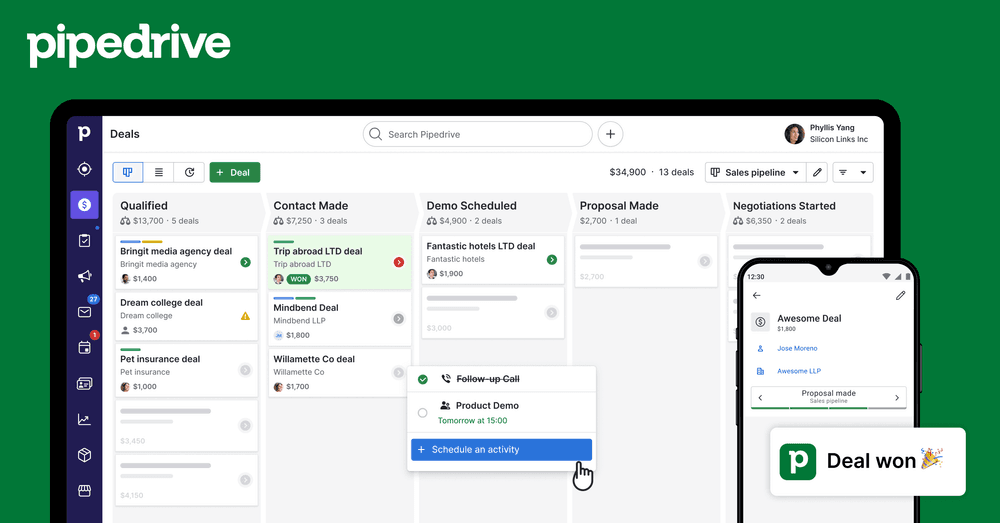

The easy-to-use sales CRM designed to help teams close more deals.
Pipedrive is a visual sales pipeline management tool that automates lead nurturing and administrative tasks. It provides teams with AI-powered insights and real-time reporting to optimize the buyer journey and drive predictable revenue.
Features
- Visual sales pipeline management
- AI-powered sales assistant and email writer
- Automated lead nurturing and follow-ups
- Real-time sales insights and custom reporting
- Email tracking and segmentation
- Revenue forecasting and goal setting
- 500+ third-party app integrations
- Mobile CRM for on-the-go deal management
Pipedrive Tutorials

 MinorCo

 Davame - Pipedrive
 MinorCo
 MinorCo
 CRM Central
 Dominic The CX Guy
 CloudMita
 Ethan Wood | CRM & Automations Expert
  MinorCo
 MinorCo
 MinorCo
 CRM Coach
 Phylux Express
 The Social Guide
 Nazim Agabekov
 Business Solution
 Business Solution
 MinorCo
 Pipedrive
 Niks Jansons l Stay Sharp
Pipedrive Alternatives

Scale cold email outreach with AI-powered lead generation and automated deliverability.

Scale personalized outbound and GTM automation with AI-powered data enrichment.

The AI-powered sales platform for prospecting, lead generation, and deal automation.


Scale cold email outreach with AI-powered deliverability and unlimited mailboxes.

Automate LinkedIn and email outreach to generate more replies effortlessly.

Scale LinkedIn outbound with unlimited sender accounts for one fixed cost.

A comprehensive go-to-market platform for B2B intelligence and sales engagement.

All-in-one platform for cold outreach and lead generation automation.

Agentic AI platform for revenue orchestration, prospecting, and deal management.

Automated LinkedIn and email outreach for high-converting sales sequences.

Professional-grade irrigation solutions for residential, commercial, and agricultural landscapes.

B2B sales intelligence platform for finding accurate contact and company data.

The leading AI-powered revenue orchestration platform for sales and customer success.

AI-powered sales engagement platform for multichannel outreach and lead generation.

Advanced sales prospecting tool for targeting, tracking, and engaging B2B leads.

The world's safest LinkedIn and email omnichannel outreach automation platform.

AI-powered live conversation platform to supercharge sales activity and pipeline.

Comprehensive email verification with 99%+ accuracy and real-time API integration.

Premium sales intelligence and compliant B2B data for global pipeline growth.

AI-powered sales platform for automated prospecting, outreach, and meeting scheduling.

The all-in-one white-label sales and marketing platform for agencies.

Real-time email verification and list cleaning to improve deliverability.

Automate lead generation and data extraction across major social media platforms.

AI-powered LinkedIn outreach and lead generation platform for scaling sales teams.

AI-powered outbound platform for personalized multichannel outreach at scale.

Multichannel sales engagement platform for cold email, LinkedIn, and calling outreach.

Human-powered AI sales acceleration for 10x more live decision-maker conversations.

Pipedrive Use cases
What is Pipedrive?
Pipedrive is a sales-focused, cloud-based CRM designed to help small and mid-sized businesses organize their sales pipelines. Unlike general-purpose platforms, Pipedrive is built around a highly visual Kanban-style interface that makes tracking deals intuitive for both beginners and experienced reps. It focuses on activity-based selling, ensuring that sales teams always know the next step required to move a deal forward.
What People Actually Use Pipedrive For
Based on our catalog of 89 demo clips, Pipedrive is most frequently used for automating the manual entry and outreach tasks that slow down sales cycles. The data shows three primary areas of focus:
- Lead Management & CRM Syncing: With 37 clips, the most common task is automatically pushing leads and activity data into the CRM. This eliminates manual data entry and ensures the pipeline is always up to date.
- Outreach Automation: Users frequently demonstrate how to build multi-step cold email sequences (17 clips) and multichannel workflows (9 clips) that combine email, LinkedIn, and phone calls into a single sequence.
- Inbound Qualification: Teams use Pipedrive for lead routing and booking (8 clips) and AI-powered inbound qualification (6 clips) to ensure high-priority prospects are fast-tracked to a meeting.
Other documented use-cases include building targeted prospect lists using ICP filters and enriching records with firmographic data to better understand a lead's tech stack before the first call.
How to Get Started: A Typical Workflow
To use Pipedrive effectively, beginners should start by customizing their pipeline stages to match their specific sales process.
- Create and Organize Deals: Use the "+ Deal" button to add new opportunities.
- Customize Your Pipeline: Drag and drop deals through stages like "Lead In," "Contact Made," and "Proposal Sent."
- Automate Outreach: Set up a cold-email sequence with automated follow-ups to maintain engagement without manual effort.
- Schedule Activities: Pipedrive’s philosophy is to always have a next activity scheduled. Use the interface to log calls and set reminders for follow-ups.
Tips and Common Mistakes
- Avoid Manual Entry: Use the Pipedrive Marketplace to integrate with tools like Slack or QuickBooks. Our demos show that syncing leads automatically is the most efficient way to maintain data integrity.
- Watch for Email Constraints: Be aware that advanced email sync features are often locked behind higher-tier plans. Small teams should verify their plan level before building complex sequences.
- Focus on Sales, Not Just Marketing: Pipedrive is deeply deal-focused. If your business requires heavy marketing automation or complex long-term client service management, you may find the reporting restrictive compared to a platform like HubSpot.
Pipedrive Alternatives
If you are comparing Pipedrive to other tools, several alternatives offer specialized features. HubSpot Sales Hub is often cited for its robust free tier and marketing integration, while Close CRM (70 demos) is preferred by high-volume outbound teams for its built-in power dialers. For those focused on automated data research and enrichment, Clay (80 demos) or Apollo (70 demos) are frequently used alongside or instead of a traditional CRM.
Frequently asked questions
What is Pipedrive used for?
Pipedrive is primarily used for visual sales pipeline management, helping teams track deals through various stages. According to our data, it is also heavily used for syncing leads to the CRM automatically and building automated cold-email sequences.
Is Pipedrive CRM free?
Pipedrive is not a free CRM, though it typically offers a 14-day trial. Pricing generally starts between $14 and $24 per user per month, with advanced features like AI insights and email sync requiring higher-tier plans.
How easy is Pipedrive to use for beginners?
Pipedrive is widely considered one of the most user-friendly CRMs due to its uncluttered, drag-and-drop interface. Beginners can quickly learn to manage deals and schedule activities without the steep learning curve found in enterprise tools like Salesforce.
What are the disadvantages of Pipedrive?
Common complaints include restrictive reporting for large enterprises and a lack of advanced built-in marketing automation. It is a sales-first tool, so businesses requiring complex marketing or post-sale service management may find it limited.
Is Pipedrive similar to Salesforce?
While both are CRMs, Pipedrive is designed for ease of use and visual management for SMBs. Salesforce offers more sophisticated features and customization suited for large corporations with dedicated resources for platform management.
What is the best way to learn Pipedrive?
The best way to learn is through the Pipedrive Academy or by watching real-world tutorials. On this page, you can view 89 demo clips showing exactly how to execute specific tasks like lead routing and pipeline management.
How does Pipedrive compare to HubSpot?
Pipedrive is often preferred for its simple, deal-focused UI. HubSpot is a more comprehensive platform that includes deep inbound marketing and customer service tools, which can make it more powerful but also more expensive as you scale.