Hunter: Tutorials, Prompts, Use cases
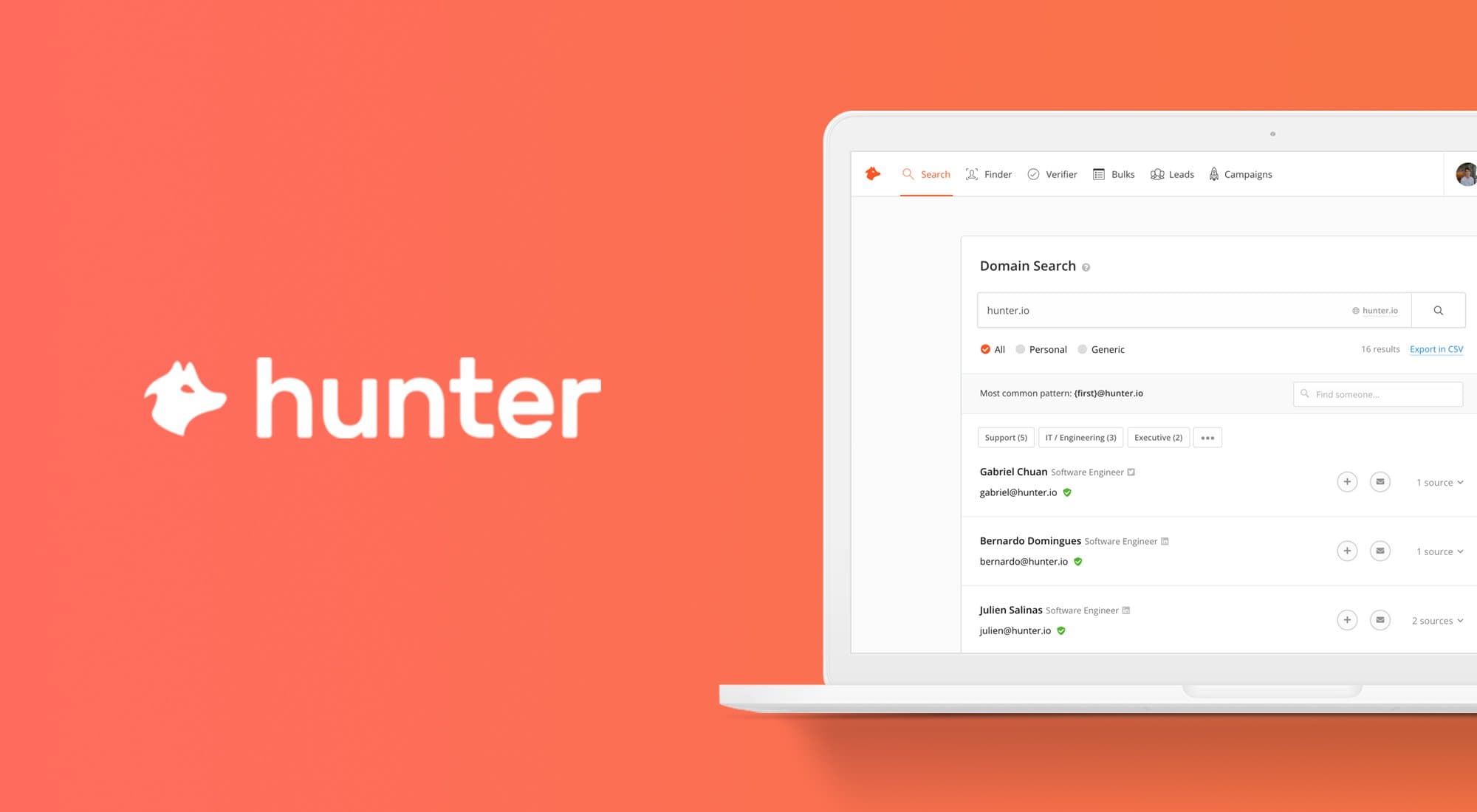

Professional-grade irrigation solutions for residential, commercial, and agricultural landscapes.
Hunter designs and manufactures high-efficiency watering systems including rotors, smart controllers, and sensors. Their technology optimizes water usage through precision engineering and automated weather-based adjustments.
by Hunter Irrigation
Features
- Smart Wi-Fi controllers
- Water-efficient pop-up rotors
- Pressure-regulated spray bodies
- Weather-sensing technology
- Drip irrigation systems
- Hydrawise management software
- Central control systems
- Flow monitoring sensors
Hunter Tutorials

 Toolysto

 Simple Answers
 Matt Crawford
 Oli Baise | Breathe Leads
 escalateur
 Hunter
 James And Jenna's Tutorials
 Hunter
 The Clueless Employee
Hunter Alternatives

The easy-to-use sales CRM designed to help teams close more deals.

Scale cold email outreach with AI-powered lead generation and automated deliverability.

Scale personalized outbound and GTM automation with AI-powered data enrichment.

The AI-powered sales platform for prospecting, lead generation, and deal automation.


Scale cold email outreach with AI-powered deliverability and unlimited mailboxes.

Automate LinkedIn and email outreach to generate more replies effortlessly.

Scale LinkedIn outbound with unlimited sender accounts for one fixed cost.

A comprehensive go-to-market platform for B2B intelligence and sales engagement.

All-in-one platform for cold outreach and lead generation automation.

Agentic AI platform for revenue orchestration, prospecting, and deal management.

Automated LinkedIn and email outreach for high-converting sales sequences.

B2B sales intelligence platform for finding accurate contact and company data.

The leading AI-powered revenue orchestration platform for sales and customer success.

AI-powered sales engagement platform for multichannel outreach and lead generation.

Advanced sales prospecting tool for targeting, tracking, and engaging B2B leads.

The world's safest LinkedIn and email omnichannel outreach automation platform.

AI-powered live conversation platform to supercharge sales activity and pipeline.

Comprehensive email verification with 99%+ accuracy and real-time API integration.

Premium sales intelligence and compliant B2B data for global pipeline growth.
AI-powered sales platform for automated prospecting, outreach, and meeting scheduling.

The all-in-one white-label sales and marketing platform for agencies.

Real-time email verification and list cleaning to improve deliverability.

Automate lead generation and data extraction across major social media platforms.

AI-powered LinkedIn outreach and lead generation platform for scaling sales teams.

AI-powered outbound platform for personalized multichannel outreach at scale.

Multichannel sales engagement platform for cold email, LinkedIn, and calling outreach.

Human-powered AI sales acceleration for 10x more live decision-maker conversations.

Hunter Use cases
What is Hunter?
Hunter (often referred to as Hunter.io) is a specialized B2B sales tool designed to help professionals find and verify work email addresses. While the name "Hunter" is shared with irrigation systems, motorcycles, and classic TV shows, in the context of sales tech, it is a go-to platform for lead generation. It is built for sales development reps, recruiters, and marketers who need to connect with decision-makers at specific companies.
What People Actually Use Hunter For
Based on our catalog of 28 real-world demo clips, the usage of Hunter is concentrated in a few high-impact areas:
- Find Work Emails (12 clips): This is the most popular task. Users enter a domain name to see a list of publicly available email addresses or use the Email Finder to get the specific contact for a known name.
- Build Cold Email Sequences (6 clips): Beyond just finding data, users leverage Hunter to create multi-step automated follow-ups to scale their outreach.
- Verify Emails & Cut Bounces (6 clips): To protect sender reputation, pros use the verification tool to ensure an address is deliverable before hitting send.
- List Building (3 clips): Users apply ICP (Ideal Customer Profile) filters to generate targeted lists from scratch.
- Trigger-Based Prospecting (1 clip): Monitoring for buying signals like recent funding rounds or hiring surges.
How to Get Started: A Typical Workflow
A beginner-friendly tutorial for Hunter usually starts with the Domain Search. You enter a company URL, and Hunter returns the most common email pattern (e.g., {first}.{last}@company.com) along with a list of discovered emails.
From there, you can save these leads to a list and run them through the Email Verifier. Once verified, the typical workflow moves to Hunter Campaigns, where you can upload your list and draft a sequence. The tool allows for custom attributes so each email feels personalized despite being automated.
Tips and Common Mistakes
According to tutorial insights, one of the biggest mistakes is skipping the verification step. Even if an email is found on a public page, it may no longer be active. Verifying first significantly reduces your bounce rate.
Another tip from experienced users: use the Hunter Chrome Extension while browsing LinkedIn or company websites. This allows you to find contact info without constantly switching tabs, making the prospecting process much faster.
Hunter Alternatives
If you are looking for different features or pricing, several alternatives appear frequently in sales workflows. Apollo (70 clips) and Snov.io (43 clips) are the most direct competitors, often offering larger databases or integrated CRMs. For those focused on heavy automation, Instantly or Clay are popular choices for scaling personalized outreach beyond what a standard email finder provides.
Frequently asked questions
What is Hunter used for?
In a professional context, Hunter is used to find and verify work email addresses. It helps sales teams and recruiters identify the correct contact information for prospects and automate cold email outreach campaigns.
How to use Hunter for beginners?
Beginners should start with the Domain Search tool by entering a company's website to see available email formats. You can then use the Email Finder for specific individuals and the Email Verifier to ensure the address is valid before sending a message.
Is Hunter.io free?
Hunter offers a free tier that includes a limited number of monthly searches and verifications. For high-volume lead generation and full access to email campaign features, paid monthly subscriptions are required.
How do I find someone's email on Hunter?
You can find an email by using the 'Email Finder' feature. Simply enter the person's full name and the domain name of the company they work for, and Hunter will return the most likely verified email address.
What are the best Hunter alternatives?
How do I verify emails in Hunter to stop bounces?
Upload your list to the Email Verifier tool. Hunter checks the mail server and format to confirm if the address is 'Valid,' 'Accept-all,' or 'Invalid,' which helps protect your email sender reputation.