GarageBand: Tutorials, Prompts, Use cases
Comprehensive educational resources and tutorials for mastering Apple's GarageBand software.
The GarageBand Guide provides expert-led tutorials, gear reviews, and courses designed for music creators on Mac and iOS. It helps users transition from absolute beginners to advanced producers through structured learning and workflow optimization tips.
by The GarageBand Guide
Features
- Beginner-to-advanced video tutorials
- GarageBand for Mac workflow guides
- iOS and iPadOS mobile production tips
- Logic Pro transition training
- Music production gear recommendations
- Software update deep dives
- Sound pack and plugin reviews
- Community-driven learning resources
GarageBand Tutorials

 ben barr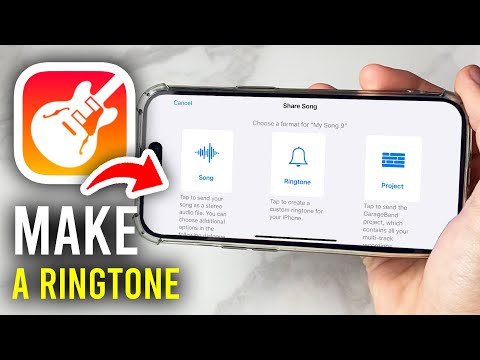
 GuideRealm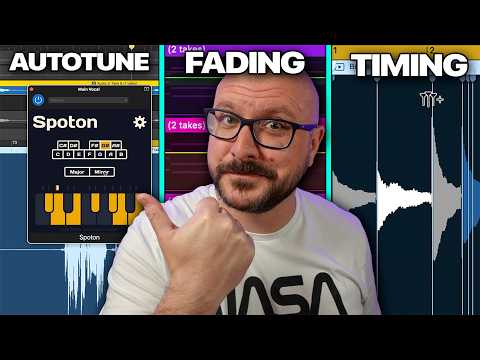
 The GarageBand Guide
 Sweetwater Soundcheck
 The GarageBand Guide
 ben barr
 The GarageBand Guide
GarageBand Alternatives

Professional workstation for precision audio editing, mixing, and sound restoration.

Create complete, high-quality original songs with vocals from simple text prompts.

The complete digital audio workstation for professional music and sound production.

Free, open-source, multi-track audio editor and recorder for all platforms.

The all-in-one digital audio workstation for music production and mixing.

Advanced AI music generator for unique, royalty-free songs and custom tracks.

A cloud-based social music creation platform for making and sharing tracks.

AI-powered vocal remover and multi-instrumental stem separation tool.

Ultra-realistic AI voice generator and conversational agent platform.

Unlimited AI music generation from text prompts and lyrics

The industry standard audio repair and restoration toolkit for professionals.

The AI-powered creative suite for musicians to practice, produce, and perform.

The all-in-one platform for music creation, AI mastering, and global distribution.
AI-powered DAW for note-level audio editing and stem separation.

Generate AI music, vocals, and instrumentals instantly from text prompts.

A complete, professional digital audio workstation for recording, editing, and mastering.

AI-powered automatic audio post-production for professional sound quality.
Generative AI platform for creating, remixing, and sharing studio-quality songs.

Professional high-quality equalizer with unrivalled sound and innovative workflow interface.

Discover, create, and share high-quality AI-generated music in seconds.

An AI music generation assistant for creating original songs in seconds.

AI music generator for creating and customizing royalty-free beats in seconds.
The world's first weekly fantasy fiction audio magazine.
AI-powered music and sound effect generation for creators of all levels

The ultimate professional music creation experience for Mac and iPad.
Professional compressor plug-in with 14 styles and immersive audio support.

AI-powered royalty-free music generator for creators, developers, and artists.

AI-powered music creation platform for generating, editing, and extending tracks.

AI-powered platform to create, remix, and distribute royalty-free music.

AI-powered online tool to extract vocals and instrumentals from any song.

Professional creative workspace for streamlined digital production and design management.

AI-powered real-time de-noise and de-reverb audio separation plug-in.
Free and open-source application for high-quality vocal and stem separation.

AI-powered stem separation for high-quality acapellas and instrumentals.
Generative AI platform for creating, remixing, and sharing studio-quality songs.

A comprehensive digital audio workstation for recording, mixing, and mastering.

A professional digital audio workstation for music production and live performance.

Create and release original generative music in seconds using artificial intelligence.
AI-powered podcast editor that removes filler words and background noise automatically.
The industry-standard digital audio workstation for music and post-production.
AI-powered healthcare assistant for personalized medical guidance and health tracking.

AI-powered noise cancellation and meeting assistant for clear, productive communication.
Instant AI-powered music mastering for professional, radio-ready sound.

Create AI-powered music covers and original songs with custom voice models.

A visual spectral warping wavetable synthesizer with powerful modulation tools.
AI-powered online tool to separate vocals from instrumental tracks for free.

A comprehensive keyboard anthology featuring thousands of world-class synth and instrument presets.

AI-powered audio separation for music, film, and speech stems.
Professional sound tuning software for Audiotec Fischer DSP products.

Advanced EQ with transient and tonal separation for surgical audio repair.

An all-in-one AI workspace for documents, design, and data automation.
Comprehensive metering and audio analysis for professional music and post-production.

A professional digital audio workstation designed for ease of use and value.

AI-powered audio restoration and script editing via a single API call.

A powerful sampling plugin to chop, flip, and isolate track stems.

Ethically trained AI music generator for studio-quality, royalty-free tracks.
A reverb and EQ dialogue match plug-in for seamless ADR workflows.

AI-powered platform for synthetic vocals, music production, and voice cloning.

AI-powered video and audio enhancement suite for professional-grade upscaling and restoration.

A versatile reverb plugin inspired by classic 1970s and 1980s hardware.

Free, open-source multimedia player for virtually any file format or platform.
Real-time AI voice agents, cloning, and text-to-speech for seamless human-like communication.
Professional loudness measurement plugin for TV, film, and streaming compliance.
GarageBand Use cases
What is GarageBand?
GarageBand is a fully-featured music creation studio that comes pre-installed on most Mac, iPhone, and iPad devices. It is designed to take creators from absolute beginners to advanced producers by offering a structured environment for recording, mixing, and sharing music. While it is often seen as an entry-level tool, it is robust enough for professional-quality demos and podcasting.
One of its primary strengths is the Apple Ecosystem integration; you can start a song on your iPhone during a commute and finish the mix on your Mac. However, it is important to note that GarageBand is exclusive to Apple platforms. There is no official GarageBand for Android, Windows, or Chromebook, despite common search queries for an APK or PC download.
What People Actually Use It For
Based on our first-party demo data, users primarily leverage GarageBand for two core functions:
- AI Audio Editor (17 Clips): The vast majority of creators use GarageBand as a DAW-style editor. Demos show users cutting audio, mixing tracks, and adjusting levels, EQ, and fades to polish their sound.
- AI Melody & MIDI Generator (1 Clip): Creators also use the tool to generate melodies, chords, and MIDI data to kickstart the songwriting process.
Beyond music, a popular use case is creating custom ringtones. By using GarageBand on iPhone to cut music, users can export any audio file directly as a system ringtone without needing a computer.
How to Get Started: Typical Workflow
To begin, open the app and select a project type (such as an 'Empty Project' or 'Ringtone').
- Set Up Your Project: Set your section length to 'Automatic' to ensure imported clips aren't cut off.
- Import or Record: Drag in an existing sound file or use a 'Touch Instrument' like the virtual drummer.
- Edit and Arrange: Use the zoom slider to get a precise view of the waveform when placing markers.
- Mix: Use the Master Track to adjust the volume of the entire project at once rather than tweaking individual tracks.
Tips and Common Mistakes
Our tutorial data highlights several ways to optimize your workflow:
- Organization: Rename generic tracks to specific labels like 'Lead Vox' and use track colors to distinguish instrument groups.
- Sound Quality: Avoid centering all vocal stacks; instead, pan matching vocal parts in pairs (one left, one right) to create a 'wall of sound.'
- The Metronome Trap: Always use headphones when recording live audio. If you don't, the metronome click will bleed into your microphone track.
- Flex Time: If you need to move audio within a track, ensure the 'Enable Flex' box is ticked in the track tab first.
Alternatives to GarageBand
If you are on Windows or Android, or if you have outgrown GarageBand's 32-track limit on iOS, consider these alternatives from our database:
- BandLab: The top free alternative for Android and Windows users, offering cloud collaboration.
- Adobe Audition: A powerful choice for those focused on surgical audio editing and podcasting (104 clips).
- Logic Pro: The natural upgrade for Mac users who want advanced MIDI routing and professional mixing consoles.
Frequently asked questions
Is GarageBand really free?
Yes, GarageBand is completely free for Apple users. It has no subscriptions or hidden trial periods and includes a massive library of royalty-free loops and virtual instruments.
Can I use GarageBand on Windows or Android?
How do I use GarageBand for ringtones on iPhone?
Import a sound file into a new project, use the editor to cut the clip to under 30 seconds, and then use the 'Share' menu to export the project as a Ringtone.
Is GarageBand easy for beginners?
Yes, it is widely considered the most accessible DAW for beginners. Features like 'Smart Instruments' and pre-recorded Apple Loops allow you to create music without knowing music theory.
Why is my recording volume so low in GarageBand?
This is a common issue often solved by using volume automation to boost low-energy sections or adjusting the Master Track volume before exporting.
Do I need an instrument to use GarageBand?
No, you can create music entirely 'without instruments' by using the built-in software instruments, MIDI generators, and the Apple Loops library.
What is the difference between GarageBand and Logic Pro?
Logic Pro is the professional version of GarageBand. While they share a similar interface, Logic Pro offers advanced features like Flex Pitch, a full mixing console, and deeper MIDI routing.