Vectorizer.AI: Tutorials, Prompts, Use cases

Convert raster images to clean, scalable vector graphics using AI.
Vectorizer.AI uses deep learning and proprietary computational geometry to transform PNG, JPG, and WebP images into high-quality SVG, EPS, PDF, and DXF files. The platform automatically detects shapes, curves, and symmetries to produce production-ready artwork for design, print, and CAD workflows.
by Vectorizer
Features
- AI-powered image-to-vector tracing
- Full shape fitting for circles and rectangles
- Sub-pixel precision for fine detail extraction
- Symmetry modeling and adaptive simplification
- Support for SVG, EPS, DXF, and PDF exports
- Automated palette detection and control
- High-performance GPU-accelerated processing
- Full 32-bit color and transparency support
Vectorizer.AI Tutorials
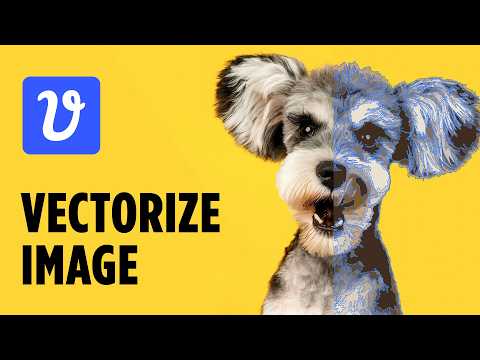
 CryeStudio Design Tutorials
 Color Gamut Consulting
 Philip Anders
Vectorizer.AI Courses
Vectorizer.AI Alternatives

A node-based visual workflow engine for professional AI image and video generation.

AI-powered photo editor for creative desktop, tablet, and mobile editing.

An independent research lab exploring new mediums of thought through AI imagery.
The most controllable AI image generation and design tool for creators.

Generative AI platform for high-quality creative asset production and image generation.

Professional AI design platform for photorealistic images and editable vector graphics.

All-in-one AI-powered photo and video creation and editing platform.

An all-in-one AI photo editing workflow for professional photographers.
All-in-one AI creative suite for images, videos, and audio generation.

AI-powered concepting board to explore, expand, and refine creative ideas.

The world’s most advanced image editing and graphic design software.
Agent-native image generation and editing using code-based intermediate representations.

An AI-first design platform for professional branding and creative assets.

AI-powered node-based platform for professional design and creative workflows.

A powerful creative AI suite for real-time image, video, and 3D generation.

Free, unlimited AI image generation for creators and world-builders.

Create stunning AI-generated art using multiple state-of-the-art algorithms and models.
AI-powered culling, editing, and retouching for professional photographers.

AI-powered face swapping for photos, videos, and GIFs without watermarks.

AI-powered photo enhancer to upscale, unblur, and restore images to 8K.

The ultimate AI creative studio for high-definition image and video generation.
Next-generation face manipulation and high-fidelity face swapping platform.

One-click AI enhancer for professional-grade photo, video, and document upscaling.
Advanced AI conversational assistant for text generation and problem solving.

AI-powered product photography studio for high-converting e-commerce and fashion imagery.
Browser-based AI suite for instant image and video editing and transformation.

AI-powered storytelling and anime art generation for creative writers and artists.

Advanced AI image generation and editing with streamlined SDXL model support.

An experimental AI tool for image-to-image prompting and visual storytelling.
Convert text to unique, licensed images with AI-powered generation.

AI-powered background removal for transparent PNGs and professional product photos.

All-in-one AI studio for professional photo and video creation and editing.
All-in-one AI image and video generation platform for e-commerce and marketing.

A professional online photo editor that runs directly in your browser.

Create consistent AI-generated photos and videos featuring your own digital identity.

Transform ideas into stunning AI-generated images and photorealistic art in seconds.


Free, unlimited AI image and video generator with state-of-the-art models.

AI fashion model generator transforming flat lays into high-end on-model photos.

All-in-one AI platform for high-resolution image and video enhancement.

Unified multimodel API for high-performance AI at a fraction of the cost.

A fair-code workflow automation platform combining visual building with custom code.

AI-powered photo editor and listing studio for professional e-commerce visuals.

All-in-one AI studio for professional video and image creation.

A comprehensive online design platform for creating professional visual content easily.

Transform AI-generated skin textures into photorealistic, high-fidelity human skin.

A comprehensive platform for high-quality photos, vectors, and design templates.

AI-powered image enhancement and upscaling for professional quality results.



Generate professional AI images from text prompts using advanced neural architecture.


Access over 100 frontier AI models through a single unified subscription.

The largest library of 3D packaging mockups, dielines, and design templates.

Run and deploy open-source machine learning models with a cloud API.
Generative AI for creative expression and professional content creation.

Professional AI-powered photo and video editing for instant, high-quality enhancements.
The world's first AI design agent for end-to-end brand campaigns.
Instant AI-powered background replacement for professional product photography.
An AI-powered storytelling platform for professional video and image generation.
A creative production studio specializing in culture-defining commercial content.

All-in-one AI platform for high-quality image and video creation and editing.

An all-in-one online creative platform for photo editing and graphic design.
Fast, private, and offline AI image generation for Apple devices.

The central collaboration platform for the global machine learning community.

Real-time image and video optimization with AI-powered digital asset management.


AI-powered visual production agent for eCommerce and catalog scaling at speed.

An all-in-one AI creativity platform for art, video, and character chat.

Create AI images, cinematic videos, and face swaps in seconds.

A unified generative AI canvas for scaling professional creative workflows.

Agent-native image generation and editing with code-based precision and 4K rendering.

AI-powered tool to remove watermarks from images, videos, and PDFs instantly.

AI-powered photo editor and beauty camera for professional-grade selfies.
An all-in-one AI platform for text, image, audio, and video creation.

The all-in-one AI platform and super assistant for enterprise automation.
Cloud-based photo editing and organization for photographers of all skill levels.

Transform low-resolution images into stunning 4K photos with advanced AI restoration.

Turn selfies into 4K professional AI headshots in under an hour.

Create and edit stunning visuals in seconds with AI-powered imaging tools.

An all-in-one creative AI platform for images, video, and music.

Google's advanced text-to-image model for high-fidelity photorealistic creative assets.

Professional AI business headshots without a physical photo shoot.

Advanced AI image upscaler and enhancer for high-resolution creative workflows.

AI-powered graphic design tool for creating professional visuals instantly.

Create studio-quality product visuals and marketing content using advanced AI tools.
Agent-native image generation and editing using code-based intermediate representations.

Cloud-based ComfyUI with zero setup, high-speed GPUs, and scalable APIs.

AI-powered online photo editor for effortless object removal and image enhancement.

A latent text-to-image diffusion model for high-quality, photo-realistic image generation.

AI-powered removal of watermarks, logos, and objects from photos and videos.

AI-powered object and watermark removal for photos and videos across all platforms.

All-in-one AI platform for content, images, video, and audio generation.

AI-powered photorealistic hair transplant previews for clinics and patients.

Advanced AI image generator specializing in accurate typography and graphic design.

Free AI-powered image upscaler providing high-resolution enhancements up to 16K.
Transform AI-generated skin textures into photorealistic, indistinguishable human results.

Studio-quality AI headshots and professional profile pictures in 30 minutes.

AI-powered image and video generation, editing, and restoration studio.


AI-powered image and video upscaling for high-resolution visual enhancement.

All-in-one AI video and image creation platform for professional content.

The AI content engine for startups to rank on Google and LLMs.


Tailor-made generative AI API for fine-tuning and personalized image creation.

Privacy-focused AI background removal and replacement without image uploads.

An intuitive online design tool with AI-powered features and professional templates.

A large-scale unsupervised language model for high-quality text generation.


Custom metal retail fixtures and stock display components for top retailers.

Free online AI face swapping for photos, videos, and GIFs.

AI-powered photo and video editor for portraits and creative visual art.

AI-driven real-time path tracing and production-level visualization ecosystem.
Unified generative AI platform for professional image and video creation.

Transform low-resolution images into stunning 4K quality with AI-powered enhancement.
AI-powered studio for professional avatars, character design, and video generation.

AI-powered toolkit for professional portraits, face swaps, and image enhancement.
Free AI-powered image upscaling up to 16K resolution without sign-up.
AI-powered tool to colorize, restore, and enhance old black and white photos.

AI-powered image upscaling, enhancement, and creative editing tools for high-quality visuals.


Free AI image and video prompt gallery for instant content generation.

AI-powered academic writing assistant for high-scoring, plagiarism-free essays.

AI-powered photo editor for studio-quality portraits and e-commerce product images.
Transform low-quality photos and videos into high-definition masterpieces with AI.

Remove image backgrounds automatically in five seconds with one click.

Advanced AI face swapping for images, videos, and live webcam streams.

A unified enterprise platform for professional AI image and video generation.

AI agent-powered content creation platform with ComfyUI and infinite canvas.

AI-powered fashion models and product image generation for e-commerce growth.

Sharpen, denoise, and upscale images with intelligent AI-powered enhancement tools.

Professional AI headshot generator that turns a single selfie into studio-quality portraits.

Convert raster images into scalable vector graphics online
The industry-standard vector graphics software for creating logos, icons, and illustrations.


The central platform for creative file management, review, and collaboration.

A comprehensive hub for generative AI tools, resources, and educational insights.

All-in-one AI photo editing platform and high-performance API service.

All-in-one AI workspace for content creation, study, and multimodal chat.

Free online AI tool for realistic face swaps in photos and videos.

AI fashion model generator transforming flat lays into professional on-model photos.
A single AI assistant providing access to all top-tier LLMs and agents.

The world's largest community for sharing and discovering generative AI models.

All-in-one AI creative platform for video, image, and music generation.


All-in-one AI platform for creating images, videos, copy, and slides.

A versatile communication platform for gaming, hanging out, and building communities.
The most realistic professional AI headshot generator for corporate branding.


AI-powered face swapping for high-quality photos, videos, and GIFs.

All-in-one AI fashion design, virtual try-on, and photoshoot platform.

The collaborative interface design tool for teams to build products together.
An experimental AI-powered research and productivity tool from Google

Build and share machine learning web interfaces using only Python.

A comprehensive web-based suite for fast, free, and bulk image editing.

Master AI image prompt creation with powerful optimization and generation tools.
Professional open-source vector graphics editor for designers and illustrators.

AI agents and workflows purpose-built for enterprise marketing teams.

AI-powered all-in-one PDF editor for seamless document management and conversion.

Remove unwanted objects, people, and watermarks from photos with AI precision.
A faithful web-based remake of classic MS Paint with modern enhancements.

Discover your family history through DNA testing and genealogical research.
The full-stack React framework for high-performance web applications.

Software-connected automated test and measurement systems for engineering and manufacturing.
All-in-one AI-powered RAW photo editor and organizer without subscription requirements.

Create professional AI-generated product photography in seconds without Photoshop skills.

All-in-one AI photo editor for background removal and image enhancement.

A lightning-fast online graphic design suite and photo editor for marketers.

All-in-one marketing platform for AI-powered design, social media, and email.

Create professional AI headshots and creative profile pictures in seconds.

AI-powered professional headshots for corporate profiles and social media.
Reimagine everyday life through AI-native mobile apps and creative face-swapping.

AI agent-powered content creation platform featuring ComfyUI workflows and infinite canvas.

Create professional high-resolution product mockups directly in your browser.


Enterprise-grade generative AI platform for professional content production at scale.

Free browser-based AI image generation powered by Stable Diffusion models.

The leading open-source headless CMS for JavaScript and TypeScript developers.

Professional AI headshot generator for LinkedIn and corporate teams.
AI-powered image enhancement and upscaling for high-resolution professional visuals.

Professional photo and video editing suite with creative community and business tools.

Vectorizer.AI Use cases
What is Vectorizer.AI?
Vectorizer.AI is a specialized web-based tool designed to solve the problem of pixelation. Unlike standard tracing tools, it uses proprietary computational geometry to detect shapes, curves, and symmetries within PNG, JPG, and WebP files. It is primarily built for designers, print-on-demand creators, and CAD professionals who need high-quality SVG, EPS, PDF, or DXF outputs without the manual labor of redrawing paths in software like Adobe Illustrator.
Real-World Use Cases
Based on our catalog of 11 demo clips, users primarily utilize this tool for two specific tasks:
- Image to Vector (7 Demos): This is the core function. Users upload low-resolution logos, sketches, or AI-generated art to create clean, mathematical paths. Tutorials highlight its ability to handle complex graphics with multiple colors, not just simple black-and-white icons.
- AI Background Remover (4 Demos): The tool is also used to isolate subjects by cleanly deleting background layers during the vectorization process, which is particularly useful for preparing t-shirt designs.
Typical Workflow: From Pixels to Paths
To get started, navigate to the web interface and drag your raster image onto the landing page. The AI typically takes 5 to 10 seconds to process the geometry. Once finished, you are presented with a split-screen view: the original pixelated image on the left and the smooth vector result on the right.
Before downloading, you can use the color palette tool to simplify the design. Tutorials suggest that reducing the color count to the exact number needed (e.g., just black and the background) ensures the cleanest results and removes tiny gaps. Finally, choose your format—SVG is recommended as the most universal standard, though EPS and DXF are available for specific print and CAD workflows.
Expert Tips and Common Pitfalls
According to real tutorial insights, success with Vectorizer.AI often comes down to color management:
- Simplify the Palette: Use a small number of colors for a cleaner graphic look. If you are printing on black shirts, preview your design against a black background to ensure visibility.
- Inspect Tight Spaces: Hover over the result to check low-pixel areas and tight gaps for accuracy. If the AI accidentally removes internal colors, you may need to fill them back in using a vector editor like Illustrator or CorelDRAW.
- Avoid Over-Simplification: While fewer colors are better for t-shirts, reducing the count too far (e.g., below 5 for a complex image) can cause a significant loss in quality.
Is Vectorizer.AI Free?
A common question is whether the tool is free. While you can upload images and view the high-quality vector previews for free, a paid subscription (typically $10/month) is required to download the final files. For those seeking alternatives, tools like Recraft (44 demos) or Luminar Neo (78 demos) offer different image editing capabilities, while open-source software like Inkscape remains a popular free choice for manual tracing.
Frequently asked questions
Is Vectorizer.AI free?
No, Vectorizer.AI is not a free tool for downloading files. While it offers a free web-based preview to see how your image will look as a vector, a paid subscription (approximately $10/month) is required to download the SVG, EPS, or DXF results.
What does Vectorizer.AI do?
It converts raster images like PNG and JPG into scalable vector graphics. It uses AI to detect shapes and smooth out curves, allowing you to resize images infinitely without losing quality or seeing pixels.
How does Vectorizer.AI work?
The tool uses deep learning and computational geometry to trace the lines and shapes in a pixelated image. It fits mathematical curves to these shapes and exports them as paths rather than a grid of pixels.
Is Vectorizer.AI safe?
Yes, it is a reputable web-based tool used by designers to process logos and artwork. It runs in your browser and does not require software installation, though you should always be mindful of the privacy of the images you upload to any cloud-based service.
What are the best Vectorizer.AI alternatives?
Popular alternatives include Recraft, which also features vectorization tools, and professional software like Adobe Illustrator or the free, open-source Inkscape. Other web-based options include Vectorizer.kiwi and Vector Magic.
Can I use Vectorizer.AI for t-shirt design?
Yes, it is highly effective for print-on-demand. Tutorials recommend reducing the color palette to the minimum necessary colors to ensure the vector is clean and easy for printers to process.
Why does my vectorized image look pixelated in the preview?
The initial preview may appear pixelated for a few seconds while the AI processes the geometry. Once the vectorization is fully refreshed, the right side of the split-view will show smooth, clean lines.