Synthesia: Tutorials, Prompts, Use cases

The #1 AI video platform for creating studio-quality videos with avatars.
Synthesia enables businesses to generate professional videos from text using AI avatars and voiceovers in over 160 languages. The platform streamlines production by replacing traditional cameras and microphones with an intuitive AI-driven video editor.
Features
- 240+ diverse AI avatars
- AI voices in 160+ languages
- One-click AI video translation
- Text-to-video document transformation
- Real-time team collaboration tools
- Brand kit and asset management
- Interactive video elements
- SOC 2 and GDPR compliant security
Synthesia Tutorials

 Synthesia
 Synthesia
 Synthesia
 Agrollo Reviews
 Simon Crowe
 Synthesia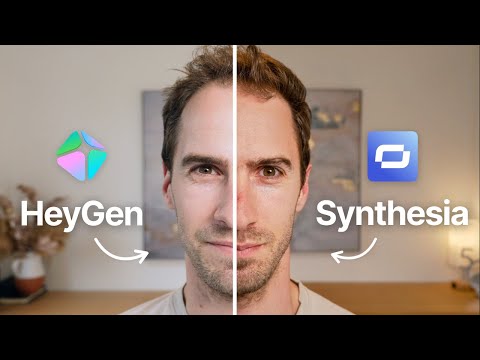
 Intellagents
Synthesia Courses
Synthesia Prompts
Synthesia Alternatives

Create cinematic AI videos and images with advanced character consistency.

A user-friendly online video editor with AI-powered tools and stock assets.

AI-powered video editing software for professional results on desktop and mobile.

Professional video editing, color correction, visual effects, and audio post production.

AI-powered video and photo editor for trending social media content.

All-in-one AI creative studio for images, video, music, and models.

Next-generation AI creative studio for high-fidelity video and image generation.

AI-powered video creation and editing integrated with Google Workspace.

Intuitive video editing software with powerful AI-driven creative tools.

AI-powered video and audio editing as simple as editing a document.


Next-generation AI for high-fidelity video generation and world simulation.

AI-powered video creation platform for professional filmmaking and social media content.

Edit short-form videos 10x faster with AI-powered automation and captions.

Create professional AI videos with lifelike avatars and instant voice dubbing.

The ultimate AI creative suite for video, image, and audio generation.

An AI-powered creative studio for cinematic video and image generation.

Transform text and photos into high-quality AI-generated videos and viral content.

An all-in-one AI-powered video editor for effortless professional content creation.

AI-powered video creation and editing platform for social media and marketing.

Cinematic-grade video enhancement and upscaling powered by advanced AI models.

AI-powered video generation platform for social ads and ecommerce creatives.

AI-powered video creation from text, scripts, and blog posts.

All-in-one AI video generator for text, images, and reference-based content.

Free web-based screen recorder with templates and real-time collaboration.

Convert text, images, and videos into high-quality AI animations and art.

Create professional AI videos 10x faster with avatars and realistic voices.

All-in-one AI generator for shoppable UGC and viral social videos.

Create high-converting video ads using realistic AI actors and avatars.
Google’s multimodal AI assistant for writing, planning, and creative brainstorming.

A comprehensive AI-driven platform for end-to-end cinematic video production.

Turn long-form videos into viral short-form clips with generative AI.
AI-powered video enhancer for upscaling footage to 4K and 8K resolution.

AI-powered video enhancement for upscaling, denoising, and colorizing low-quality footage.

An AI-powered creative agent for professional video, image, and avatar generation.

AI agent that turns one prompt into platform-ready video content.
The fastest path from prompt to production with Gemini models.

An AI-powered video editor that automates the entire content creation workflow.

AI-powered online video maker and editor with professional templates.

AI-powered creative agents that plan, generate, and refine professional workflows.

The official mobile video editing app for YouTube creators.

An advanced conversational AI with real-time knowledge and unfiltered responses.

All-in-one AI creative platform for high-quality video and image generation.

All-in-one AI video generator powered by leading generative models.


TikTok’s AI-powered creative studio for end-to-end video production and optimization.
A high-speed multimedia toolkit to convert, edit, and burn video content.
End-to-end AI video generation from scripts, voice, and brand assets.
The fastest path from prompt to production with Gemini models.

Transform text, scripts, and blog posts into videos with AI voices.

Free AI-powered platform for high-quality image and video generation and editing.

AI-powered platform to generate high-converting video and image ads at scale.


AI-powered video creation platform for brands and social media content.

All-in-one AI platform for video, music, and voiceover creation.

Generative AI platform for personalized visual marketing and high-fidelity video production.

AI-powered collaborative video editor for modern creators and marketing teams.

AI-powered podcast production tool for transcripts, show notes, and social clips.

All-in-one AI workspace for creation, learning, and professional productivity.

Create AI-generated images, cinematic videos, and face swaps for free.

The official community-driven leaderboard for ranking and comparing top AI models.
AI-powered text-based video and audio editing for faster content creation.

A comprehensive AI creative suite for video, image, and audio generation.

Advanced generative AI tools and foundational models for creative expression and productivity.

Create professional AI videos and viral effects from text or images.

An AI creative agent for strategizing, ideating, and executing multimedia content.
AI-powered platform for studio-quality animation and live-action video creation.

The fastest generative media platform for developers and enterprise scale.

Controllable AI video generation for turning photos into viral animations.

AI-native cloud infrastructure and advanced multimodal models for enterprise growth.

Next-generation AI assistant for safe, accurate, and complex reasoning tasks.

Create AI-powered avatar videos and photo animations with a single click.

All-in-one AI creative studio for video, image, and audio production.

Multilingual 3D talking head generation with high-accuracy lip synchronization.

An all-in-one AI-powered creative platform for photo and video editing.

A comprehensive AI studio for multimodal understanding and content generation.

Patented AI video maker for turning text and audio into professional content.

An AI-powered creative platform for advanced image and video generation.

AI-generated video creation platform for interactive digital humans and avatars.

Create professional AI-generated videos using text-to-speech and realistic digital avatars.

Multimodal AI for conversational video generation and advanced media editing.

An AI-powered video editor that lets you edit footage like text.
Create professional content quickly with all-in-one AI-powered design tools.

Create AI-powered short videos featuring realistic digital clones and avatars.

Transform single photos into viral AI-powered videos and social media content.

AI-powered toolkit for comprehensive video and audio processing and editing.

Studio-grade AI video lipsync and visual dubbing for any content.
AI-powered data repair tool for corrupted videos, photos, and documents.

Professional remote recording studio for high-quality podcasts and video content.

AI-powered intellectual property development and digital reading ecosystem for global creators.

High-quality creative assets for video creators and filmmakers.

AI-powered video generation studio for cinematic text-to-video and image-to-video creation.

Turn long videos into viral short-form content with one click.

Fast and intuitive video editing software for professional-quality movie creation.

An all-in-one AI assistant powered by the GLM-5 large language model.
Cinematic AI video generation with precise multi-keyframe control and scalable workflows.

Create complete, long-form AI videos up to 50 minutes long.

All-in-one AI platform for professional image and video creation and enhancement.

A free, web-based screen recorder for capturing high-quality video and audio.

A single API for 300+ multimodal AI video, image, and LLM models.

Create studio-quality videos with lifelike AI avatars in minutes.

Frontier multimodal AI models for coding, video, and agentic automation.

Animate 3D characters for games, films, and interactive experiences instantly.


A browser-based tool to trim, crop, and rotate video files.
Industrial-grade AIGC video generation model for cinematic quality content

Transform ideas into professional-quality videos using Google Gemini AI.
Create professional videos instantly using AI avatars, templates, and text-to-video tools.

Enterprise AI platform for building data-driven agents, dashboards, and automated workflows.

A complete, cross-platform solution to record, convert, and stream audio and video.
Free professional-grade video editing and visual effects software for creators.
The #1 AI-powered photo and video generator for viral social content.

An agentic AI platform for end-to-end recruiting efficiency and precision.

Create, collaborate, and deliver professional presentations across devices.

Record, edit, and share narrated screen recordings on ChromeOS

Free live streaming studio with multistreaming and webcam splitting capabilities.

A smart and reliable AI assistant for personal productivity and creativity.

Secure cloud storage and collaboration with zero-knowledge end-to-end encryption.

Free, uncensored AI tools for image generation and video animation.
Synthesia Use cases
What is Synthesia AI?
Synthesia is a browser-based AI video platform designed primarily for business communications, learning and development (L&D), and corporate training. It streamlines production by allowing users to generate professional videos from text, utilizing AI avatars and voiceovers in over 160 languages. Unlike traditional video editing, it eliminates the need for microphones, cameras, or physical studios, making it a popular choice for teams needing to produce high volumes of content quickly.
What People Actually Use It For
Based on our analysis of 34 real-world demo clips, usage is concentrated in several key areas:
- AI Avatar Video Generator (13 clips): This is the primary use-case, where users create a digital presenter to deliver a script directly to the audience.
- AI Video Editor (7 clips): Users frequently leverage the platform to cut, merge, and add transitions to their generated scenes.
- Script to Video AI Generator (5 clips): This workflow involves generating a full multi-scene video from a single text prompt or script.
- Translation and Dubbing (5 clips): Businesses use Synthesia to translate and dub audio into other languages while maintaining lip-syncing.
Other demonstrated tasks include screen recording, AI animation generation, and creating generic b-roll via the stock video generator.
How to Get Started: Typical Workflow
To use Synthesia for beginners, the process typically follows a slide-based logic. You start by selecting a pre-built template or a blank canvas. You then input your script into the editor; our tutorials suggest using a detailed description from a tool like ChatGPT to improve the initial draft.
Once the script is in, you select your avatar and voice. You can customize the avatar’s position and even match their shirt color to your brand. After adding text elements and background music—tutorials recommend lowering music volume to around 40% so it doesn't overpower the voice—you must click 'Generate' to see the final lip-synced result. Note that the preview mode often blurs the mouth or only plays audio to save processing power.
Tips and Common Mistakes
- Visual Engagement: Add text and on-screen elements to make the video more presentable. You can hover over motion options to preview effects before applying them.
- Audio Quality: If you are recording your own voice for a custom avatar, ensure your space is quiet and remember to pause and smile.
- The Credit Trap: Be aware that the dubbing process and final video generation consume account credits.
- Branding: If you want to use company logos on an avatar's clothing, this typically requires an Enterprise plan, and logos must be uploaded to the platform beforehand.
Synthesia Alternatives
If you are looking for a Synthesia alternative, several tools offer different strengths. HeyGen is often cited for higher avatar quality, while Colossyan is tailored for L&D with integrated quizzes. For those needing traditional timeline editing, Camtasia or Descript (69 clips) provide more granular control over the final cut.
Frequently asked questions
How to use Synthesia AI for free?
Synthesia typically offers a way to test the platform by creating a free AI video on their website. However, full access to the editor and the ability to download MP4 files usually requires a paid subscription.
Is it Synthesia or synesthesia?
Synthesia is the name of the AI video generation platform and a popular piano learning app. Synesthesia (with an 'e') refers to a neurological condition where senses like hearing and sight merge.
What is Synthesia pricing?
Pricing is tiered into Starter, Creator, and Enterprise plans. Starter plans generally range from $18 to $29 per month, though costs scale based on the number of video minutes required.
How to use Synthesia for beginners?
Beginners should start with a template and paste a script into the editor. It functions like a slide deck; you can customize the avatar and voice on each slide before hitting the 'Generate' button to process the final video.
What are the pros and cons of Synthesia?
Pros include massive time savings and easy multilingual support. Cons include a 'robotic' feel in some movements and the fact that you cannot see the final lip-syncing until you spend credits to generate the video.
Can I download Synthesia?
Synthesia AI is a web-based platform used in your browser, so there is no desktop software to download. The Synthesia piano app, however, is available for download on Android and other platforms.
Is Synthesia better than HeyGen?
It depends on your needs. Synthesia is often preferred by large enterprises for its security and L&D features, while HeyGen is frequently cited in reviews for superior avatar realism and marketing flexibility.