AI Motion Graphics for Social Media & Content Creation
Social graphics, creator/UGC content, platform-specific templates
AI Motion Graphics for Social Media & Content Creation Tutorials
19 demos

Jun 2026 · 248 views Patrik Key
Patrik Key23:013:53CapCut
Creating a cursor click animationThe creator demonstrates how to animate a hand cursor to simulate a 'click' on a UI element using scale and position keyframes.AI Motion Graphics

Feb 2026SSalih Tutorials
1:170:44Filmora
Animate path drawing using Trim PathThe user shows how to use the 'Trim Path' settings and keyframes to make the drawn line appear progressively on the screen.AI Motion Graphics
2:011:30Filmora
Attach a preset object to a motion pathThe demonstration shows how to use the 'Path Follow' box to select a helicopter preset and link it to the previously drawn pen path.AI Motion Graphics5:070:39Filmora
Link timeline stickers to a motion pathThe user demonstrates the 'Select from Timeline' option to link a car sticker to a straight pen path using the Path Follow feature.AI Motion Graphics7:040:24Filmora
Hide the motion path strokeThe user demonstrates how to set the stroke to 'none' in the pen path settings so that only the moving object is visible, not the guide line.AI Motion Graphics
Jan 2026SSalih Tutorials
3:101:35Filmora
Animating trim paths with keyframesThe creator demonstrates how to use the trim path settings and add keyframes to the timeline to create a 'draw-on' reveal animation for a shape.AI Motion Graphics6:031:08Filmora
Animating glow and flicker effectsThe demonstration covers applying a glow stroke effect and using keyframes to animate glow intensity, flicker speed, and flicker intensity for a magical effect.AI Motion Graphics
Jan 2026WWondershare Filmora Video Editor
0:291:05Filmora
Create path animation with the Filmora Pen ToolThe creator demonstrates how to draw a box and use the Pen Tool to outline it, applying a neon effect and keyframing the offset to create a glowing path animation in Filmora.AI Motion Graphics3:220:55Filmora
Animate objects along a path in FilmoraThe demonstration shows how to draw a custom path with the Pen Tool and link a circle preset to it, causing the object to follow the path using the 'trim path' settings.AI Motion Graphics
Jan 2026WWondershare Filmora Video Editor
0:200:44Filmora
Create and customize animated charts in Filmora 15The user demonstrates how to locate the animated chart effect, customize data inputs via Excel, and modify the visual style by disabling headers and adjusting animation duration.AI Motion Graphics
Jan 2026 · 1.3K views Hallease
Hallease9:451:46Adobe Express
Creating a podcast intro from a templateThe creator selects a video podcast template and demonstrates customizing the text, letter spacing, and music to create a branded intro.AI Motion Graphics

Nov 2025FFilmora for Creators
1:330:26Filmora
Draw a curved path with the Pen ToolThe narrator walks through clicking the preview screen, holding and dragging to create curved strokes, and extending the layer duration to match the map animation.AI Motion Graphics3:090:28Filmora
Animate path drawing with Trim PathThe narrator demonstrates using the Trim Path effect and keyframes to animate the line drawing from 0% to 100% completion.AI Motion Graphics3:370:44Filmora
Add path-following elements in Filmora 15The tutorial shows how to select presets like airplanes or ships to follow the created path, including adjusting their scale and adding shadow effects.AI Motion Graphics
Nov 2025MMomentum Productions
1:010:19Filmora
Create animated charts in Filmora 15The user navigates to the toolbox to select, customize, and add animated pie and bar charts directly to the video timeline.AI Motion Graphics3:280:32Filmora
Animate shapes with the Pen ToolThe user draws a rectangle over a frame using the pen tool and applies keyframes to the in-and-out animation parameters to create a highlight effect.AI Motion Graphics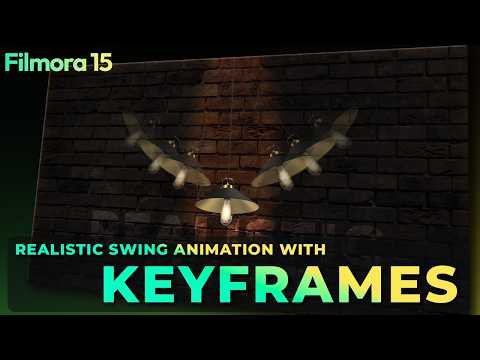
Feb 2026FFilmora for Creators
3:510:26Filmora
Duplicating and varying animationsThe user demonstrates duplicating tracks, replacing assets via drag-and-drop, and modifying existing keyframes to create variation between multiple swinging lights.AI Motion Graphics
Oct 2025CCrossle
0:261:13Filmora
Create a rotating text wheel in FilmoraThe creator demonstrates how to set up a background, create a compound clip with shapes, and use the title section to arrange text in a circular pattern by duplicating layers and adjusting rotation values.AI Motion Graphics
Jun 2026WWondershare Filmora Video Editor
2:420:14Filmora
Apply textures to text in FilmoraThe narrator walks through the text settings to choose a texture fill, showing how to use presets or upload a custom PNG.AI Motion GraphicsAI Motion Graphics for Social Media & Content Creation Tools
3 tools
AI-powered video editing software for professional results on desktop and mobile.
191 tutorialsSocial Media & Content Creation
Create professional content quickly with all-in-one AI-powered design tools.
8 tutorialsSocial Media & Content Creation