Lalal.Ai: Extracting clean drum stems

 Lalal.Ai
Demo summary
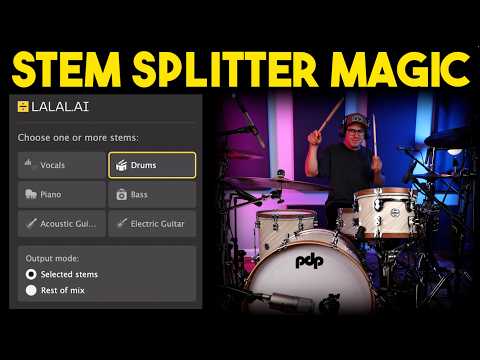
The creator uses the web-based stem splitter to extract a high-quality drum track and compares the result to the original full mix.
Step-by-step
- Navigate to the stem splitter tool
- Select the Drums option from the stem list
- Click to create new previews
- Play the drum stem to check for clarity and artifacts
- Play the track without drums to hear the instrumental separation
Watch out for
- The extracted stem will still contain some minor artifacts as it is not a perfect process
Tips
- Use the extracted drum snaps or specific elements for other production projects
- Compare the AI extraction against DAW plugins to verify the crispness of the audio
Highlights
“this is probably one of the best ones I've used so far”
All demos from “I Found a Secret Plugin for Vocal Removal - LALAL.Ai”
- 1:521:23Isolating vocals and drums with LALAL.AI pluginThe creator demonstrates the LALAL.AI plugin within a DAW, toggling between vocal and drum isolation modes and adjusting latency settings to reduce artifacts.Lalal.Ai· AI Vocal Remover & Stem Splitter
- 7:213:14Splitting stems via LALAL.AI web interfaceThe demonstration shows uploading a track to the website and switching between 'Voice and Noise' and 'Vocal and Instrumental' modes to isolate lead vocals, harmonies, and electric guitars.Lalal.Ai· AI Vocal Remover & Stem Splitter
- 10:350:53Separating lead and backing vocalsUsing the 'Lead and Back Splitter' tool on the LALAL.AI website, the creator demonstrates how to isolate the main vocal track from the background harmonies.Lalal.Ai· AI Vocal Remover & Stem Splitter
- 11:541:11Extracting clean drum stemsCurrentThe creator uses the web-based stem splitter to extract a high-quality drum track and compares the result to the original full mix.Lalal.Ai· AI Vocal Remover & Stem Splitter
- Watch “I Found a Secret Plugin for Vocal Removal - LALAL.Ai” →
AI Vocal Remover & Stem Splitter
 0:411:37Split vocals and instrumentals with LALAL.AI appThe user demonstrates dragging an audio file into the LALAL.AI standalone app, selecting the V6 Andromeda neural network, and processing a vocal/instrumental split.Spinlight Studio
- 3:070:20Extract drums using LALAL.AIThe user demonstrates isolating drum stems from an instrumental track within the LALAL.AI app to prepare for a drum replacement task.Spinlight Studio
- 4:482:31Real-time stem splitting with LALAL.AI VST pluginThe user demonstrates the LALAL.AI VST plugin inside Logic Pro, showing how to switch between 'Selected Stems' and 'Rest of Mix' modes to isolate audio in real time.Spinlight Studio
- 9:301:21Separate lead and backing vocalsThe user demonstrates the 'Lead and Back' separation feature in the LALAL.AI app to split a vocal track into three distinct files.Spinlight Studio
- 12:431:12Extract acoustic guitar stemsThe user demonstrates selecting the acoustic guitar stem option in LALAL.AI to extract and then boost the guitar levels within Logic Pro.Spinlight Studio
 2:321:25Stem separation with LALAL.AIThe creator uploads an audio file to the LALAL.AI website and demonstrates splitting the track into vocal and instrumental stems, as well as isolating the bass track.Lanewood Studios
- 17:051:14Using the LALAL.AI VST plugin in a DAWThe creator demonstrates the LALAL.AI VST plugin inside Cubase, showing how to toggle specific stems and adjust latency for real-time local AI processing.Lanewood Studios
 0:151:20Extract vocals and instrumentals with LALAL.AIThe user selects the 'vocal and instrument' option, uploads a file, and plays back the generated previews to evaluate the isolation quality and reverb handling of LALAL.AI.Vince Xmetric
- 1:350:49Isolate drums using LALAL.AIThe user demonstrates the drum extraction feature, playing the isolated drum stem and the remaining track to check for artifacts and usability.Vince Xmetric
- 2:241:51Advanced stem splitting and de-echo settingsThe user selects the 'Andromeda' model and enables advanced settings like 'lead and back separation' and 'de-echo' to split a song into lead vocals, backing vocals, and instrumentals.Vince Xmetric
- 4:530:49Extracting synthesizers from a trackThe user selects the 'Synthesizer' stem option for a synth-heavy song and generates previews to test how well the tool separates electronic instruments.Vince Xmetric
- 1:521:23Isolating vocals and drums with LALAL.AI pluginThe creator demonstrates the LALAL.AI plugin within a DAW, toggling between vocal and drum isolation modes and adjusting latency settings to reduce artifacts.Coskun