Video-to-video style transfer with DomoAI

 DomoAI
Demo summary
The video shows how to transform an existing video into different artistic styles, such as 3D cartoon and Japanese anime, using DomoAI's video-to-video feature.
Step-by-step
- Select the video-to-video feature
- Upload or select the source video
- Choose a target artistic style such as 3D cartoon or Japanese anime
- Generate the stylized video
Options
- 3D cartoon style
- Japanese anime style
Highlights
“It's just crazy how easy this is.”
All demos from “DomoAI Just Made AI Video Creation Incredibly Simple In 2026”
- 0:240:45Text-to-video generation with DomoAIThe user demonstrates how to generate a cinematic drone shot of snowy mountains by entering a text prompt and selecting model settings and styles within the DomoAI interface.DomoAI· Text to Video
- 1:270:45Create a talking avatar in DomoAIThe creator shows the process of uploading a static image and an audio file to DomoAI to generate a video of a talking character with synchronized mouth movements.DomoAI· AI Lip Sync Generator
- 2:120:27Customizing avatar expressions in DomoAIA demonstration of using text prompts like 'enthusiastic expression' and 'blinking' to modify the facial movements of a generated talking avatar.DomoAI· AI Lip Sync Generator
- 2:390:26Video-to-video style transfer with DomoAICurrentThe video shows how to transform an existing video into different artistic styles, such as 3D cartoon and Japanese anime, using DomoAI's video-to-video feature.DomoAI· Video to Video
- 3:050:18Character-to-video transformation in DomoAIThe creator demonstrates the character video feature by transforming a real-life video of himself into a stylized AI character.DomoAI· Video to Video
- Watch “DomoAI Just Made AI Video Creation Incredibly Simple In 2026” →
Video to Video
- 2:390:26Video-to-video style transfer with DomoAICurrentThe video shows how to transform an existing video into different artistic styles, such as 3D cartoon and Japanese anime, using DomoAI's video-to-video feature.Eigi and AI
- 3:050:18Character-to-video transformation in DomoAIThe creator demonstrates the character video feature by transforming a real-life video of himself into a stylized AI character.Eigi and AI
 4:581:14Video-to-video style transfer with Domo AIThe creator demonstrates transforming an existing video into a 'soft toy' animation style using Domo AI's video-to-video feature.Paul J Lipsky
 5:290:41Transform video style with DomoAI Video to VideoThe user applies the 'Sketch Animate' template to an existing video clip to completely change its visual style while maintaining the motion.Dan - Smart Tutorials
 3:470:22Stylize videos using Video-to-VideoThe video demonstrates the Video-to-Video feature, showing how to apply styles like Japanese anime, flat color anime, and pixel art to existing video footage.Sanky
  6:110:43Video-to-Video style transfer with DomoAIThe user demonstrates the video-to-video feature by uploading a clip and applying a Japanese anime style preset to transform the visual aesthetic while maintaining the original movement.Daniel Davidson
 3:081:19Convert video to anime style with DomoAIThe creator demonstrates the video-to-video feature by uploading a clip, selecting an anime preset, and adjusting settings like 'more video' to maintain consistency with the original footage.AI Upskill
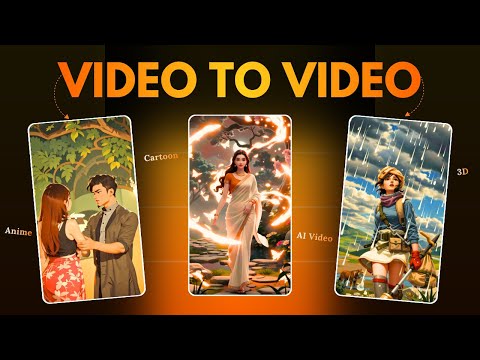 4:080:48Replace video characters with Domo AIA demonstration of the 'Character to Video' feature where a reference video and a character image (a bear) are used to replace the original subject in a scene.Hindi AI Gyaan
- 4:560:31Change video style with Domo AIThe user shows how to upload an existing video and apply a new visual style, such as 2.5D, to transform the footage using Domo AI.Hindi AI Gyaan
 3:010:30Convert video to anime style with DomoAIThe video shows the process of uploading a clip of a boxer and applying an anime style filter using DomoAI's video-to-video feature.Digital Product Wizard