AfterShoot: Outdoor portrait and hair flyaway removal
 AfterShoot
Demo summary
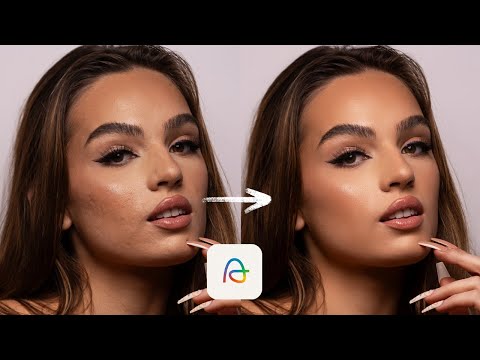
Demonstration of blemish removal and the flyaway hair tool in Aftershoot to clean up stray hairs on an outdoor creative portrait.
Step-by-step
- Max out the Blemish Removal slider
- Zoom in on the skin to inspect tonal transitions
- Adjust the Smoothing slider to even out skin tones
- Use the Eye Brighten tool to enhance the eyes
- Apply the Flyaways tool to blur out stray hairs on top of the head
Options
- Remove shadows on the nose
- Adjust eye bag removal
- Increase or decrease the intensity of flyaway removal
Tips
- Avoid going crazy with smoothing on far-away portraits as long as tones are even
- Keep a little bit of extra detail on the top of the hair for a more natural look
Highlights
“from far, it looks really, really solid”
All demos from “Photographers: Aftershoot Just Made Portrait Retouching Too Easy!”
- 1:582:31Natural portrait retouching with AftershootManny demonstrates blemish removal, skin smoothing, and eye brightening on a client rebranding portrait using Aftershoot's feminine subject selection.AfterShoot· AI Image/Photo Enhancer
- 4:481:50Fashion skin retouching in AftershootThe video shows a more aggressive retouching workflow for a fashion edit, including maxing out blemish removal and adjusting skin smoothing masks.AfterShoot· AI Image/Photo Enhancer
- 7:410:16Object removal in AftershootManny uses the object removal tool in Aftershoot to highlight and delete a beauty dish that was visible in the top of the photo frame.AfterShoot· AI Object Remover/Eraser
- 8:171:31Outdoor portrait and hair flyaway removalCurrentDemonstration of blemish removal and the flyaway hair tool in Aftershoot to clean up stray hairs on an outdoor creative portrait.AfterShoot· AI Object Remover/Eraser
- 9:581:11Male portrait retouching with AftershootManny switches the software to masculine mode to demonstrate subtle blemish removal and eye brightening on a male client portrait.AfterShoot· AI Image/Photo Enhancer
- 11:150:44Natural headshot touchup for menA demonstration of using Aftershoot to perform minimal, natural-looking touchups on a male construction worker's headshot.AfterShoot· AI Image/Photo Enhancer
- 12:041:01Shadowed face brightening and retouchingManny shows how to use the face brighten and blemish removal tools in Aftershoot on a client portrait shot in heavy shadow.AfterShoot· AI Image/Photo Enhancer
- Watch “Photographers: Aftershoot Just Made Portrait Retouching Too Easy!” →
AI Object Remover/Eraser
- 7:410:16Object removal in AftershootManny uses the object removal tool in Aftershoot to highlight and delete a beauty dish that was visible in the top of the photo frame.Manny Ortiz
- 8:171:31Outdoor portrait and hair flyaway removalCurrentDemonstration of blemish removal and the flyaway hair tool in Aftershoot to clean up stray hairs on an outdoor creative portrait.Manny Ortiz