Gender swap using VidMage AI
 VidMage
Demo summary
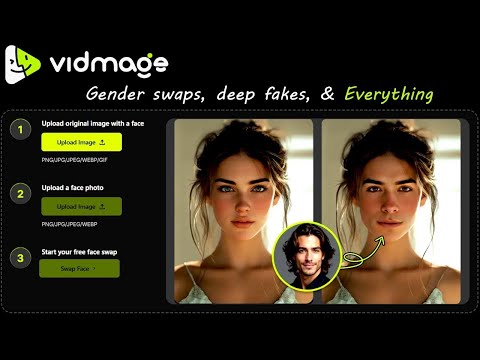
The demonstration shows swapping a female face with a male face to change the gender appearance in a photo.
Step-by-step
- Upload a photo of a female subject to the main image area
- Upload a photo of a male subject to the face photo section
- Click the swap button to initiate the gender transformation
All demos from “Top AI Expert Reveals EASY Face Swap Techniques with VidMage AI”
- 0:550:35Image face swap with VidMage AIThe user demonstrates how to upload a base image and a target face to perform an instant face swap on a photo using VidMage AI.VidMage· AI Face Swap Generator
- 1:300:35Video face swap with VidMage AIThe tool is shown processing a video file to replace a face within the footage with a target face image.VidMage· AI Face Swap Video
- 2:050:30Multiple face swap in group photosVidMage AI is used to detect multiple faces in a group photo and swap each one with different individual target images.VidMage· AI Face Swap Generator
- 2:430:33Batch face swap across multiple imagesThe user demonstrates uploading up to 30 photos to apply a single target face across all of them simultaneously using the batch swap feature.VidMage· AI Face Swap Generator
- 3:160:20Gender swap using VidMage AICurrentThe demonstration shows swapping a female face with a male face to change the gender appearance in a photo.VidMage· Gender Swap AI
- Watch “Top AI Expert Reveals EASY Face Swap Techniques with VidMage AI” →